



Paperless-ngx: Upgrade PostgreSQL to Version 18
Move Paperless-ngx on Docker to PostgreSQL 18, for example from version 13 or 14: create a dump, adjust the data path, restore your data and then update to Paperless 3.
Contents
Paperless-ngx 3.4.2PostgreSQL 18.6Docker 29.9Ubuntu 24.04If your Paperless-ngx has been running for years, it probably still sits on the PostgreSQL version from the guide you followed back then. PostgreSQL 13 has not received security updates since November 2025, and support for version 14 ends in November 2026. Newer Paperless versions also require a newer database, and that is exactly where many updates fail.
In this guide, I move an existing Paperless installation with Docker Compose to PostgreSQL 18. You cannot do that by only changing the version number in the image. A new major version cannot read the data files of the old one. That is why we back up the database as a dump and restore it into a fresh database. Your documents themselves stay untouched.
The method works for any older version. I tested it with PostgreSQL 13 and PostgreSQL 14, each time with 30 documents, tags, correspondents and a logged-in user. At the end of the article, you can see what I did not test.
Order: Database First, Then Paperless
Two rules decide the order of the steps. I reproduced both on the test server:
- Newer Paperless versions need PostgreSQL 14 or newer. Paperless 2.17.1 still ran on PostgreSQL 13, but showed the warning
PostgreSQL 13 is deprecated and will not be supported in a future Paperless-ngx release. Versions 2.18.4, 2.19.6, 2.20.0, 2.20.15 and 3.4.2 failed at startup for me withPostgreSQL 14 or later is required (found 13.23). I did not test the versions in between one by one. - Paperless 3 can only be installed from version 2.20.15. A direct jump from an older version fails with
Upgrading to v3 can only be performed from v2.20.15.
If you are still on Paperless 2.17 or older with PostgreSQL 13, the order is therefore:
- Move the database to PostgreSQL 18 (this guide).
- Update Paperless to 2.20.15 and let it start so the database migrations run.
- Then update to Paperless 3.
If you already run Paperless 2.20.15 or newer, you only need the first step.
Preparation
I assume the setup from my other Paperless guides: the Compose file has the three services broker, db and webserver, and the database lives in a folder ./db next to the Compose file. If your database service has a different name, or the user and database name differ, you enter that in variables in a moment.
Enter Your Own Values
At the top of the article you can enter four values: the name of the database service, user and database name, and the old PostgreSQL version. Your values then appear in all commands. You find them in your Compose file under POSTGRES_USER and POSTGRES_DB. The old version only appears in file names.
Which Version Is Running?
docker compose exec {{db_service}} postgres --versionpostgres (PostgreSQL) 13.23 (Debian 13.23-1.pgdg13+1)Create a Backup
A dump is the basis for the move, but it is not a complete backup. Before you start, also back up the folders media and data as well as the folder db. How to do that cleanly is covered in Paperless-ngx Backup & Restore.
Note the Numbers
Write down what is in the database beforehand. After the move, you use these numbers to check that everything arrived:
docker compose exec -T {{db_service}} psql -U {{db_user}} -d {{db_name}} -Atc \
  "select 'documents',count(*) from documents_document union all
   select 'tags',count(*) from documents_tag union all
   select 'correspondents',count(*) from documents_correspondent union all
   select 'doctypes',count(*) from documents_documenttype union all
select 'users',count(*) from auth_user"documents|30
tags|5
correspondents|6
doctypes|6
users|3The users are not only your own. Paperless creates two more by itself, which is why a single account shows up as a 3.
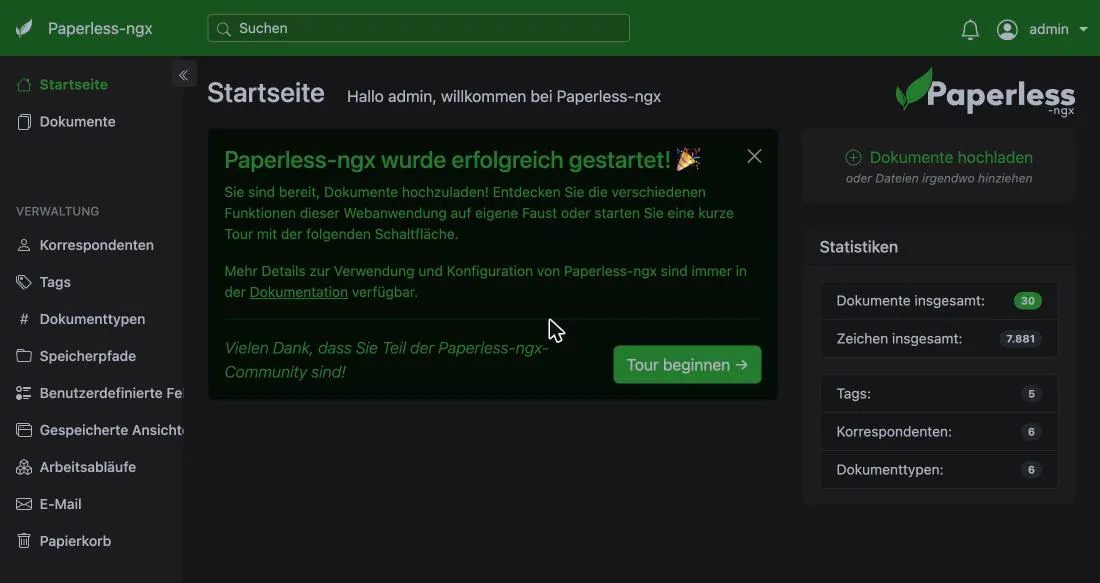
It also helps to look at the dashboard, so you can compare the numbers there as well. The screenshots show the German interface.
Create the Dump
First stop the web server so nothing is written to the database during the dump. The database itself must keep running:
docker compose stop webserverThen create the dump. The switch -T is important because the output is redirected to a file:
docker compose exec -T {{db_service}} pg_dump -U {{db_user}} -d {{db_name}} > dump_pg{{old_version}}.sql
ls -lh dump_pg{{old_version}}.sql-rw-r--r-- 1 root root 316K Nov 4 20:50 dump_pg13.sqlThe dump contains all metadata, the recognized text, tags, users and settings, but not the document files. Those live in the folder media. That is why the file is only 316 KB for 30 documents. The file name contains your old version, so you know later where the dump came from.
Create a New Database with PostgreSQL 18
Now stop all containers and move the old data folder aside. The old folder becomes your fallback, and db is empty again:
docker compose down
mv db db_pg{{old_version}}_backup
mkdir dbThen change two things in the docker-compose.yml: the image and the path of the volume.
db:
image: postgres:{{old_version}}
image: postgres:18
volumes:
- ./db:/var/lib/postgresql/data
- ./db:/var/lib/postgresqlLeave the credentials under environment (POSTGRES_DB, POSTGRES_USER, POSTGRES_PASSWORD) exactly as they were. They must match PAPERLESS_DBUSER and PAPERLESS_DBPASS on the web server. The new database is created with these values on first start.
The Data Path Is New
Images from PostgreSQL 18 on no longer store their data directly in the folder /var/lib/postgresql/data, but in a subfolder named after the version. For that, the volume has to be mounted one level higher, at /var/lib/postgresql. If you leave the old path, the container does not even start. It restarts again and again, and the log says:
docker compose logs {{db_service}}paperless-db | Error: in 18+, these Docker images are configured to store database data in a
paperless-db | format which is compatible with "pg_ctlcluster" (specifically, using
paperless-db | major-version-specific directory names).
...
paperless-db | The suggested container configuration for 18+ is to place a single mount
paperless-db | at /var/lib/postgresql which will then place PostgreSQL data in a
paperless-db | subdirectoryStart only the database and check that it runs:
docker compose up -d {{db_service}}
docker compose exec {{db_service}} psql -U {{db_user}} -d {{db_name}} -Atc 'select version()'
ls db db/18PostgreSQL 18.6 (Debian 18.6-1.pgdg13+2) on x86_64-pc-linux-gnu, compiled by gcc (Debian 14.2.0-19) 14.2.0, 64-bit
db:
18
db/18:
dockerThe data now lives in db/18/docker. The database is still empty.
Restore the Dump
Restore the dump. ON_ERROR_STOP=1 makes the process stop at the first error instead of carrying on half finished:
docker compose exec -T {{db_service}} psql -U {{db_user}} -d {{db_name}} -v ON_ERROR_STOP=1 < dump_pg{{old_version}}.sqlThe output is a long list of SQL commands, each acknowledged with CREATE TABLE, COPY, ALTER TABLE and the like. There must be no error messages. With my 30 documents, this was quick.
Now repeat the query from before. The numbers must be identical:
documents|30
tags|5
correspondents|6
doctypes|6
users|3Start Paperless and Check
Start all containers:
docker compose up -d
docker compose ps --format 'table {{.Name}}\t{{.Image}}\t{{.Status}}'NAME IMAGE STATUS
paperless-db postgres:18 Up 8 minutes
paperless-redis redis:7 Up 7 minutes
paperless-web ghcr.io/paperless-ngx/paperless-ngx:2.17.1 Up 27 seconds (health: starting)The web server needs a moment until it reports healthy. In the log, you can see that it connects to the new database:
docker compose logs webserver | grep -i postgrespaperless-web | [init-db-wait] Waiting for postgresql to report ready
paperless-web | Connected to PostgreSQLThe warning PostgreSQL 13 is deprecated is gone. In the browser, the dashboard shows the same numbers as before. In my test, the login even stayed active, because Paperless also stores sessions in the database and they were part of the dump. After the move, I also put a new PDF into the consume folder. It was imported as usual, so the database also accepts new entries.
Update Paperless to Version 3
If you still run an older Paperless version, the second part follows now. Jumping straight to latest does not work. My test from 2.17.1 to latest ended like this:
paperless-web  | [ERROR] [paperless.checks] V3 upgrade check failed: last applied documents migration is '1068_alter_document_created'. Expected '1075_workflowaction_order' (v2.20.15). Ensure you have upgraded to v2.20.15 and run 'manage.py migrate' before upgrading to v3.
paperless-web  | ?: (paperless.E002) Cannot upgrade to Paperless-ngx v3 from this version.
So go in two steps. First change the tag of the web server image to 2.20.15 and restart:
webserver:
    image: ghcr.io/paperless-ngx/paperless-ngx:2.17.1
image: ghcr.io/paperless-ngx/paperless-ngx:2.20.15docker compose up -d
docker compose logs webserver | grep Applyingpaperless-web | Applying documents.1073_migrate_workflow_title_jinja... OK
paperless-web | Applying documents.1074_workflowrun_deleted_at_workflowrun_restored_at_and_more... OK
paperless-web | Applying documents.1075_workflowaction_order... OKOnce the last migration 1075_workflowaction_order has run and the container reports healthy, set the tag to 3.4.2, for example, and restart:
docker compose up -d
docker compose ps --format 'table {{.Name}}\t{{.Image}}\t{{.Status}}'NAME IMAGE STATUS
paperless-db postgres:18 Up 10 minutes
paperless-redis redis:7 Up 9 minutes
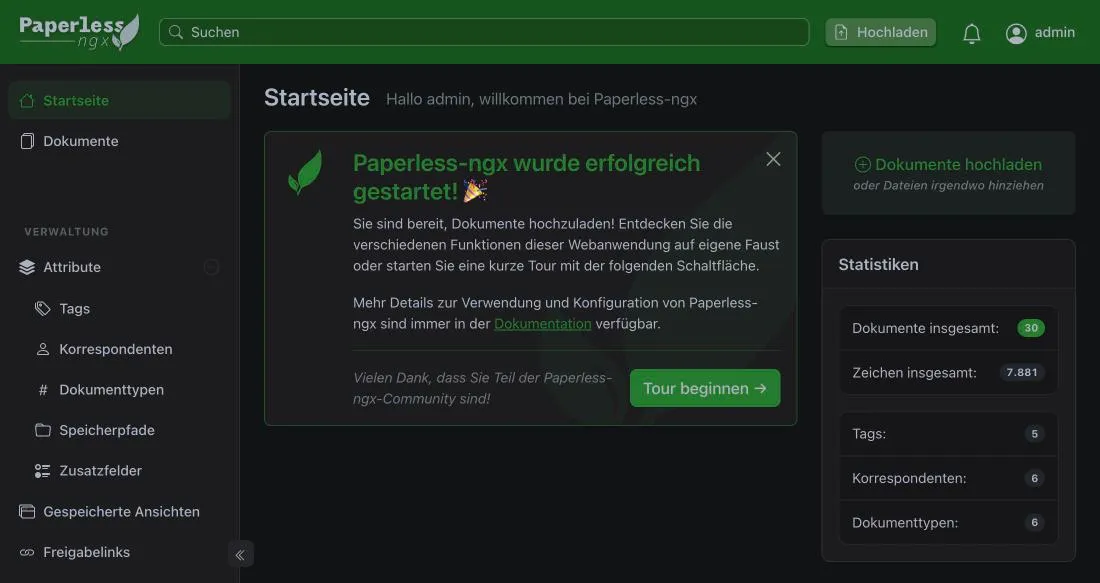
paperless-web ghcr.io/paperless-ngx/paperless-ngx:3.4.2 Up 37 seconds (healthy)In my test, that was Paperless 3.4.2. Documents, tags, correspondents and users were all still there.
Clean Up
Leave the backups in place for a few days and use Paperless as usual. If everything stays stable, you can delete them:
rm -r db_pg{{old_version}}_backup
rm dump_pg{{old_version}}.sql
If Something Goes Wrong
- The database container keeps restarting: Check the path of the volume. It must be
/var/lib/postgresql, not/var/lib/postgresql/data. PostgreSQL 14 or later is required: Your web server is newer than the database. Move the database as described above.Cannot upgrade to Paperless-ngx v3 from this version: Go to 2.20.15 first, let the migrations run and then update to 3.- Back to the old state: Stop everything, delete the new folder
db, renamedb_pg<VariableSpan name="old_version">13</VariableSpan>_backupback todband set image and volume path in the Compose file back to the old values. I did not test this.
What I Did Not Test
I tested the move from PostgreSQL 13 and 14 to 18 with a folder as data storage (bind mount) and 30 documents. I did not test:
- databases from PostgreSQL 15, 16 and 17 (the procedure is the same, the source version does not matter for the dump),
- a named Docker volume instead of a folder (for PostgreSQL 18 you then need a new volume, because the mount path changes),
- installations on Synology or with Portainer, and additional services like Tika and Gotenberg,
- large databases (how long dump and restore take depends on the size),
- the
pg_upgraderoute and the way back to the old state.
Conclusion
Moving to PostgreSQL 18 with a dump is quickly done if you keep three things in mind: the new data path /var/lib/postgresql, the unchanged credentials, and the order database first, then Paperless via 2.20.15 to version 3. As long as the old data folder stays in place, you risk nothing.
FAQ
Frequently asked questions
Can I just raise the PostgreSQL version in the image for Paperless-ngx?
No. A new PostgreSQL major version cannot read the data files of the old one, so the container fails to start or aborts. You back up the database with pg_dump and restore it into a fresh database of the new version.
Why does the data path change with PostgreSQL 18?
The Docker images from PostgreSQL 18 on store the data in a subfolder named after the version, for example /var/lib/postgresql/18/docker. The volume therefore has to point to /var/lib/postgresql and no longer to /var/lib/postgresql/data.
Do I lose my documents during the move?
No. The document files live in the folder media, which the dump does not touch. The dump only contains the database with metadata, recognized text, tags, users and settings. You only move the old database folder aside and delete it once everything runs stably.
Does this guide also work with PostgreSQL 14 or other versions?
Yes. You enter your old major version at the top. I tested PostgreSQL 13 and 14. I did not run PostgreSQL 15, 16 and 17 myself, but the pg_dump procedure is the same.
In what order do I update the database and Paperless?
First the database to PostgreSQL 18, then Paperless to 2.20.15 and only then to version 3. Paperless 3 can only be installed from 2.20.15, and newer Paperless versions require at least PostgreSQL 14.
How do I go back if something goes wrong?
Stop the containers, delete the new folder db, rename the saved folder back to db and set image and volume path in the Compose file back to the old values. I did not test this way back, which is why a full backup belongs before you start.