

How to Install Plausible Analytics with Docker & Traefik
Install the privacy-friendly Google Analytics alternative Plausible with Docker and Traefik. Set up self-hosted web analytics on your own server step by step.

The easiest way to evaluate page views would probably be to use Google Analytics. However, Google Analytics is questionable in terms of data protection. Countless websites have this tool built in, and users are tracked before they can object. I would prefer to install a self-hosted, privacy-friendly alternative on my server.
Plausible is a lightweight and open-source web analytics tool. Your website data is 100% yours and the privacy of your visitors is respected. – Plausible Analytics
Plausible Analytics is an open-source web analytics tool and a privacy-friendly alternative to Google Analytics. Although it does not offer as much data as Google, it is less likely to infringe the visitor’s rights. The prerequisite for this installation is a server setup with Docker, as described in my other guide. In this case Traefik acts as a reverse proxy.
After the connection to the server has been established, the setup can be started.
cd ~/docker
git clone https://github.com/plausible/hosting plausible
cd plausible
mkdir data
openssl rand -base64 64 >> plausbile-conf.env
There is now a password in the plausible-conf.env file.
nano plausible-conf.envWe change the content of the file from:
BASE_URL=replace-me
SECRET_KEY_BASE=replace-me
2IjLp8b9/19rTGKalAs8lbQfGO4CvXgIVleBZW7K/fEWkExFjq6CLYMCGNqm579pW4Cb0ps2IWXUx/xMGgD6ig==
To:
BASE_URL=https://plausible.somedomain.de
SECRET_KEY_BASE=2IjLp8b9/19rTGKalAs8lbQfGO4CvXgIVleBZW7K/fEWkExFjq6CLYMCGNqm579pW4Cb0ps2IWXUx/xMGgD6ig==
The last line now also contains the variable name.
The docker-compose file should be slightly adapted.
version: "3.3"

### NETWORKS ###
networks:
    web:
        external:
            name: web
    internal:
        external: false
    default:
        driver: bridge

### SERVICES ###
services:
    mail:
        container_name: mail
        image: bytemark/smtp
        restart: always
        networks:
            - internal
        labels:
            - "traefik.enable=false"

    plausible_db:
        container_name: plausible_db
        image: postgres:14-alpine
        restart: unless-stopped
        networks:
            - internal
        volumes:
            - ./data/db-data:/var/lib/postgresql/data
        environment:
            - POSTGRES_PASSWORD=postgres
        labels:
            - "traefik.enable=false"

    plausible_events_db:
        container_name: plausible_events_db
        image: clickhouse/clickhouse-server:22.6-alpine
        restart: unless-stopped
        networks:
            - internal
        volumes:
            - ./data/event-data:/var/lib/clickhouse
            - ./clickhouse/clickhouse-config.xml:/etc/clickhouse-server/config.d/logging.xml:ro
            - ./clickhouse/clickhouse-user-config.xml:/etc/clickhouse-server/users.d/logging.xml:ro
        ulimits:
            nofile:
                soft: 262144
                hard: 262144
        labels:
            - "traefik.enable=false"

    plausible:
        container_name: plausible
        image: plausible/analytics:v2
        restart: unless-stopped
        networks:
            - internal
            - web
        command: sh -c "sleep 10 && /entrypoint.sh db createdb && /entrypoint.sh db migrate && /entrypoint.sh run"
        depends_on:
            - plausible_db
            - plausible_events_db
            - mail
        env_file:
            - plausible-conf.env
        labels:
            - "traefik.enable=true"
            - "traefik.http.routers.plausible-rtr.entrypoints=https"
            - "traefik.http.routers.plausible-rtr.rule=Host(`plausible.somedomain.de`)"
            - "traefik.http.routers.plausible-rtr.tls=true"
            - "traefik.http.routers.plausible-rtr.service=plausible-svc"
            - "traefik.http.services.plausible-svc.loadbalancer.server.port=8000"
            - "traefik.http.routers.plausible-rtr.middlewares=chain-basic-auth@file"

volumes:
    geoip:
        driver: local
The domain at the host must be changed. Now we start the Plausible server with docker-compose up -d and wait until the Docker containers have started.
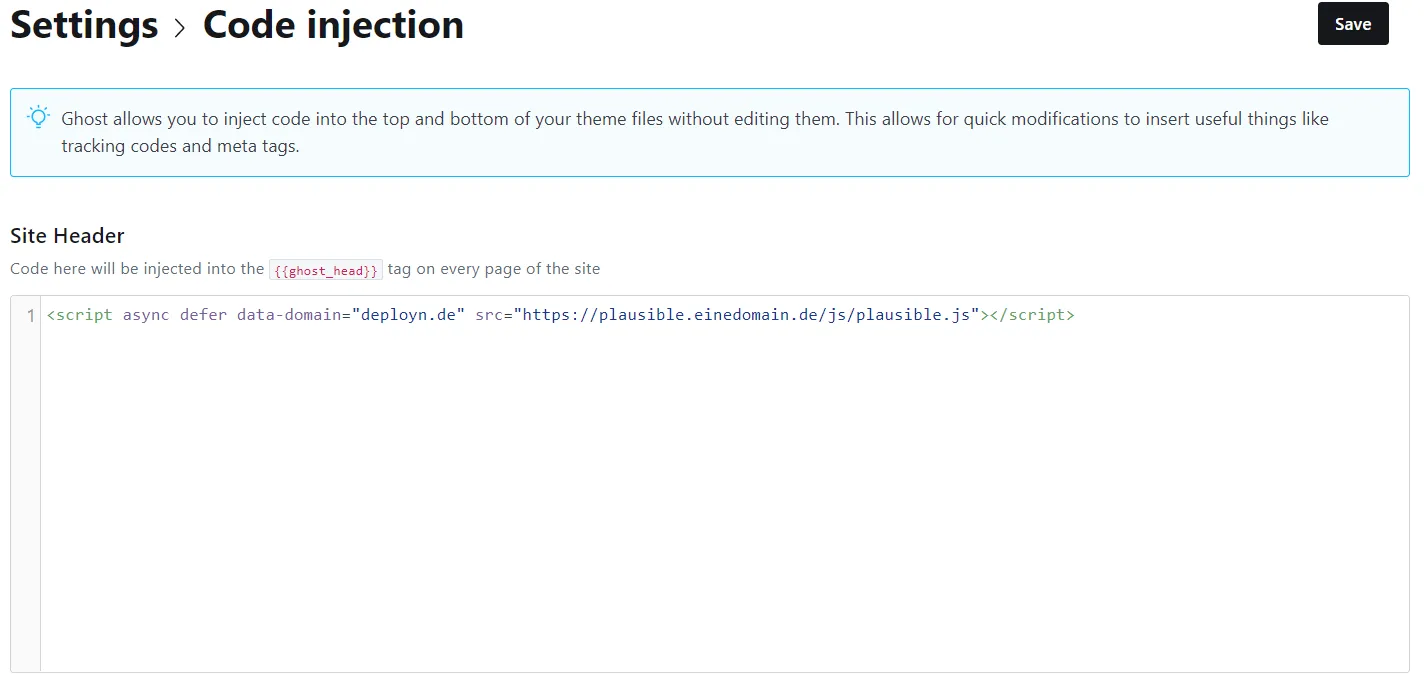
We look at the logs via lazydocker and then call “traefik.einedomain.de” to see if there are any errors. If no errors are displayed, the “plausible.einedomain.de” page can be accessed. At the end of the process you will receive a short code block <script async defer data-domain="deployn.de" src="https://plausible.somedomain.de/js/plausible.js"></script> which you only have to integrate into your page.
Integration in Ghost
For example, if you have a Ghost blog (instructions for this), you can integrate the code into the site header via the graphical user interface
However, this only works in most cases as long as Ghost is not run headless.